Auto-ruleson profit, not only on spend.
A rule reads what the tracker says a campaign earns next to what the ad account says it costs, and acts on Meta and TikTok while the team is busy elsewhere.
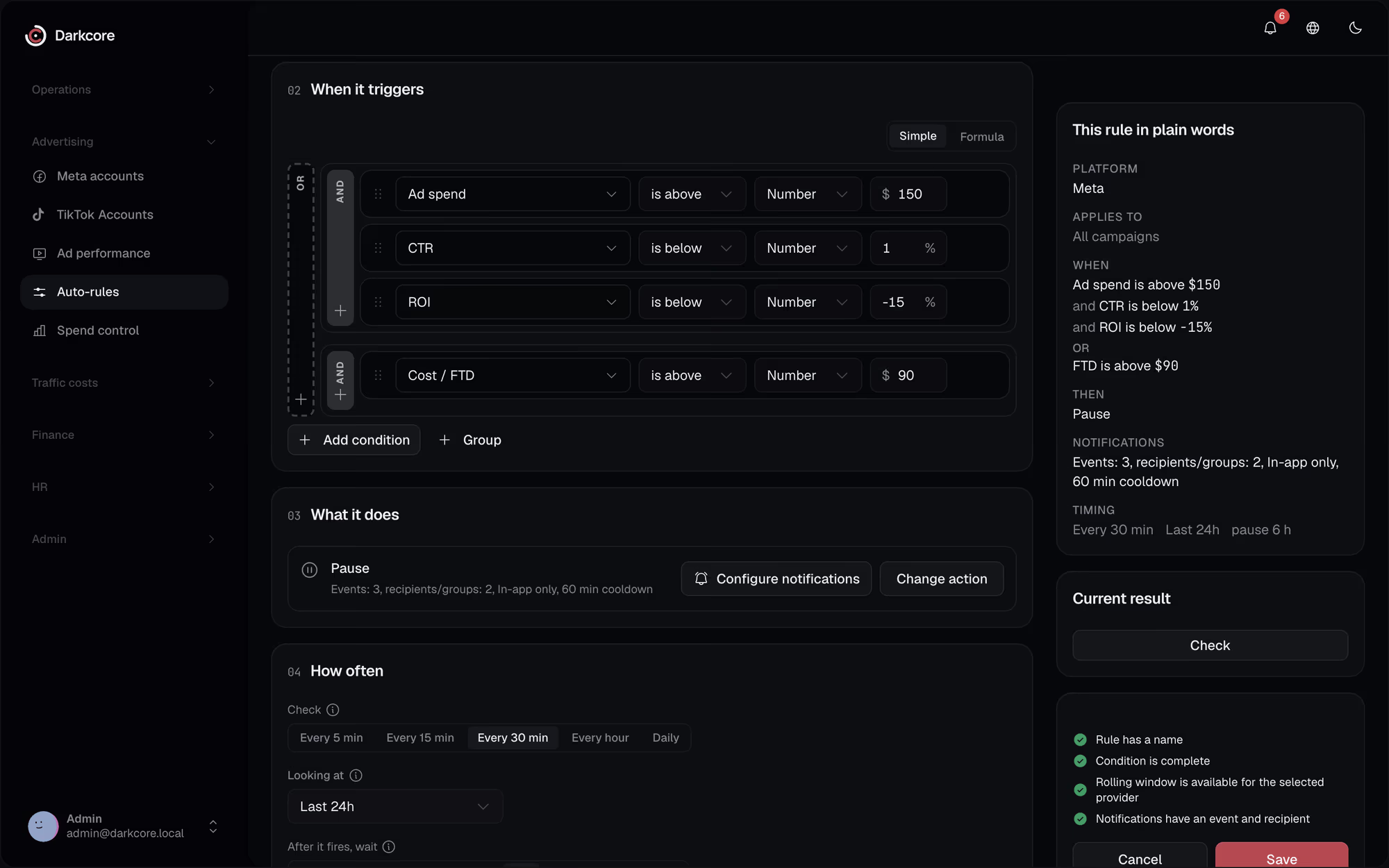
Cabinet rules see spend and CPI, but not the deposits, so they pause the wrong campaigns.Here a rule sees profit and ROI from the tracker before it touches anything.
A rule you can trust.Because you tried it first.
Tracker and cabinet together
Spend, CPI, CPM and CTR from the ad account, revenue, profit, ROI, EPC and cap left from the CRM, plus your own metrics.
Campaign, ad set or ad
Over today, yesterday or the last 3, 6 or 24 hours, checked every 5, 15 or 30 minutes, hourly or once a day.
Actions with limits
Pause for a set time, activate, or just notify, on Meta and TikTok. On Meta a rule also sets or shifts a budget within a floor and a ceiling and duplicates a winner a set number of times a day.
Backtest, dry run, review
Run a rule on past days, preview what it would do, or have it wait for a person to approve each action. Every run is logged.
Every run on record.What it saw, what it did.
The rules list shows what each rule did lately. Open a run to see the campaigns it matched, the action it took and the result.

Questionsabout this feature.
Can a rule change a campaign without asking?
Only if you let it. Each rule can act right away, only notify, or wait for review of every action.
Do rules do the same on Meta and TikTok?
Pause, activate, notify and review work on both. Setting a budget and duplicating are Meta actions.
Can I test a rule before it runs?
Yes. Backtest it on past days or run it dry to preview the matches without acting.
Which metrics can a condition use?
Cabinet metrics such as spend, CPI, CPM and CTR, tracker metrics such as revenue, profit, ROI and EPC, cap left, events, and your own metrics. Tracker metrics work on campaigns.
See it on your own numbers.
Write to us in Telegram. We will show the CRM on the way your team buys traffic.